NusaTrip Payment Banner
NusaTrip Payment Guide With BNI Debit Online
BNI Debit Online

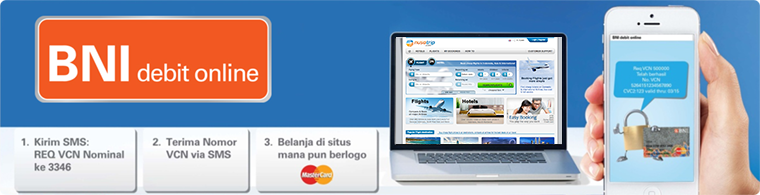
BNI Debit Online is a model of innovation / alternative payment easy, fast and secure for online shopping transactions at NusaTrip.com by using the Virtual Card Numbers (VCN) in lieu of the original number of BNI Debit Card (MasterCard Logo) which the funds come from savings / current account individual BNI
REQUIREMENTS USING DEBIT BNI ONLINE

  1. Have a Savings Account / Current Account Individual BNI and BNI Debit Card (MasterCard logo)
  2. Have done Registration & Activation BNI SMS Banking at BNI branch office

HOW TO PAY NUSATRIP TRANSACTION BY USING BNI DEBIT ONLINE

Mechanism of action and process transactions using BNI Debit Online

BNI Transactions Process
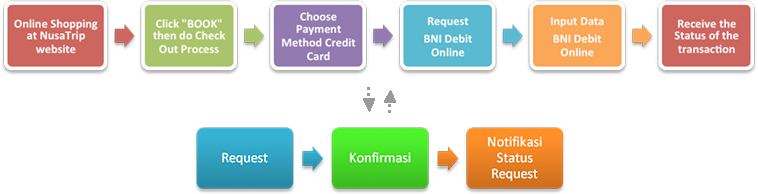
  1. Buyers visit the NusaTrip.com website and book hotel or flight ticket to be purchased
  2. Click "Book Now" to enter a selection of items to be purchased and then do the "Checkout"
  3. Perform the payment process on the payment page, select the payment method "Credit Card"
  4. Perform Process Request BNI Debit Online (VCN)
    1. Request VCN Via Syntax BNI SMS Banking

      Req VCN
      Picture 1
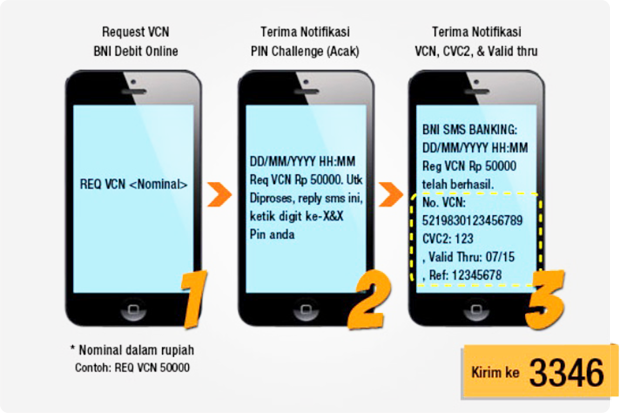
      1. Type REQ VCN (Nominal) through BNI SMS Banking, send to 3346. (picture 1 step 1)
      2. Receive SMS replies from BNI, contains command to typing 2-digit random number of your PIN. (picture 1 step 2)
      3. Customers get a status notification of request BNI Debit Online through BNI SMS Banking which contain information 16 digit Virtual Card Numbers (VCN), Valid thru (MM/YY), and 3 digit number CVC2. (picture 1 step 3)
    2. Request VCN Via "BNI SMS Banking"" application menu (download at Android, iOS, BB)
    3. Request VCN Via BNI USSD** (access/dial *141#)
      1. Call/Dial : *141#
      2. Choose appropriate sequence of menu numbers
      3. Choose menu "E-Commerce"
      4. Choose menu "E-Payment"
      5. Choose menu "BNI Debit Online (VCN)"
      6. Input Limit Nominal Request VCN
      7. Input PIN Challenge BNI SMS Banking
      8. Receive SMS Notification related BNI Debit Online Information
      **) accessible to providers Telkomsel, Indosat, & XL Axiata
  5. Fill data (16 digit VCN, 3 digit CVC2 dan Valid Thru) appropriate status notification of request BNI Debit Online (picture 1 step 3) at the columns that have been available on the payment page (picture 2)

    NusaTrip Payment
    Picture 2

    After inputing BNI Debit Online, click the "Pay Button" for the verification of transactions.
  6. If the payment is successful, customers will receive a notification of payment from NusaTrip.com via email
    For detail information, visit BNI website: Panduan_BNI_Debit_Online_di_Web_BNI or:
  7. BNI Info